Step 1:
Select Candidates from main menu.
Step 2:
Click on a candidate (You can pick any candidate)
Select "Profile" tab
Look for "Available Jobs" in secondary tabs and click on it
Hit the button "Customize how Candidates view and interact with shift jobs"
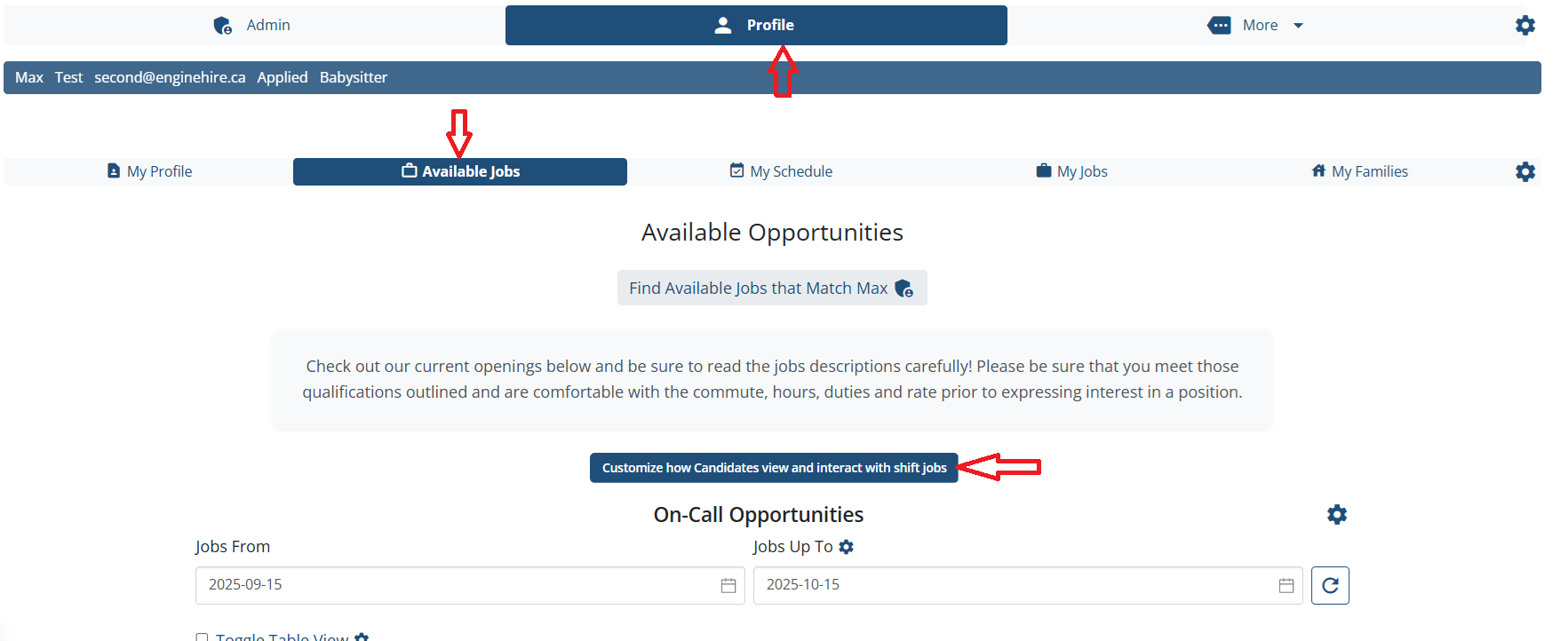
Step 3:
In setting popup click on option " Requesting to work and accepting shifts"
Find the setting "Candidates can self assign themselves to shift jobs" - Enable it
Save the changes.
Adjusting this setting for one candidate will adjust this setting for all candidates.
Result:
Candidate will be able to see "Accept Job" button for a shift job on "Available Job" tab
The following video is from a previous interface but the information is still accurate.
{% video_player "embed_player" overrideable=False, type='hsvideo2', hide_playlist=True, viral_sharing=False, embed_button=False, autoplay=False, hidden_controls=False, loop=False, muted=False, full_width=False, width='688', height='364', player_id='163757750429', style='' %}
If this doesn't answer your questions you can always contact us by clicking here
